Item Wise Last Sales and Purchase Price
Item Wise Last Sales and Purchase Price
Based on the buying and selling prices of each stock item, you may want to maintain the rates such that they automatically appear when you pass a transaction. You can do this in Tally.ERP 9 and Tappy Prime by providing the standard cost (for purchase), and standard price (for sales) for each stock item.
You can maintain rates for the stock items on a daily basis or a specific period based on your business needs.
When you record the purchase and sales invoices, the standard cost and standard price will appear for that stock item automatically. Also, you may want to fix the selling price of items at different rates to customers, based on the type of the customer or your preferences.
For this, in Tally.ERP 9, you can use a price list.
Customization
By Using this Customization you can DIsplay the last Sales price and Last purchase Price in the sales T|ransaction directly as per below-provided Screenshot
In Sales :
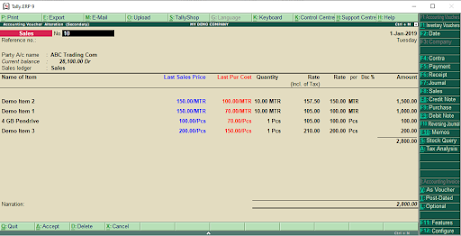
In Purchase :

You can avoid using Stock Query at that time so It will definitely save your time and effort.
You can simply download our customized TDL from Below Provided Link and you can configure it in Tally and then when you will try to make a new transaction you can get the information of Item wise Last sales Price and Lat purchase price of that particular Item automatically.
This is how you can get detailed information,
TDL Code :
[#line:EI columnone]
add : Right Field : at beginning : LSALEPRICE, LPURCOST
Local : Field : LPURCOST : Info : Last Pur Cost
Local : Field : LSALEPRICE : Info : Last Sales Price
[#line:EI INVINFO]
Add : Right Field : At beginning : LPURCOST
Add : Right Field : At beginning : LSALEPRICE
[Field : LPURCOST ]
Use : Rate Field
Set : $lastpurcprice:stockitem:$stockitem
Skip : Yes
Color : Red
Style : Large Bold
Width : 13
[Field : LSALEPRICE ]
Use : Rate Field
Set : $lastsaleprice:stockitem:$stockitem
Skip : Yes
Color : Blue
Style : Large Bold
Width : 13
;;End of the code
Please Support us by Subscribe our YouTube Channel for more Video and Free TDL





please call me 9826643210
ReplyDeletedefine
ReplyDeleteLast Sale Rate particulate Party
I am interested in such topics so I will address page where it is cool described. click here
ReplyDeletedilippatel557@gmail.com Tally erp9
ReplyDeletedidnt find any tdl please mail me the tdl anuragsbc1914@gmail.com
ReplyDeleteParty wise last sales Ka tdl upload kare sir
ReplyDeletePartywise last sales and purchase par tdl banaiye na sir
ReplyDeletenot working its not showing anything in rate plz send new jmn.patanjali@gmail.com
ReplyDelete